
Top 10 Frontline Intranet Features You Need
A frontline intranet has to do more than shrink a desktop experience onto a phone. Here are the 10 frontline intranet features you need to make frontline teams feel connected and empowered.

Frontline workers make up roughly 2.7 billion people globally, about 80% of the entire workforce. Yet, most intranets are still designed around the other 20%: the people who sit at a desk, hold a corporate email address, and have time to browse a homepage. That mismatch shows up everywhere, from missed safety alerts to workers defaulting to WhatsApp groups nobody can moderate or audit.
This list is deliberately cross-functional. A few of these features are things Comms will champion, some belong to HR, and a few are squarely Ops and IT's call. The strongest rollouts plan and implement all 10 in close collaboration between these functions, not as a single department's initiative, so every feature here deserves a seat at the table when you're designing your next solution.
The list is also grounded in independent research. Gartner's 2025 Magic Quadrant for Intranet Packaged Solutions and ClearBox Consulting's Intranet & Employee Experience Platforms 2026 report both treat frontline and mobile capability as a distinct, scored evaluation area, not an afterthought bolted onto a desktop feature list. This is the same lens we have used to build the list.
Frontline Intranet Feature #1. Real-Time Communication Without Shadow Apps
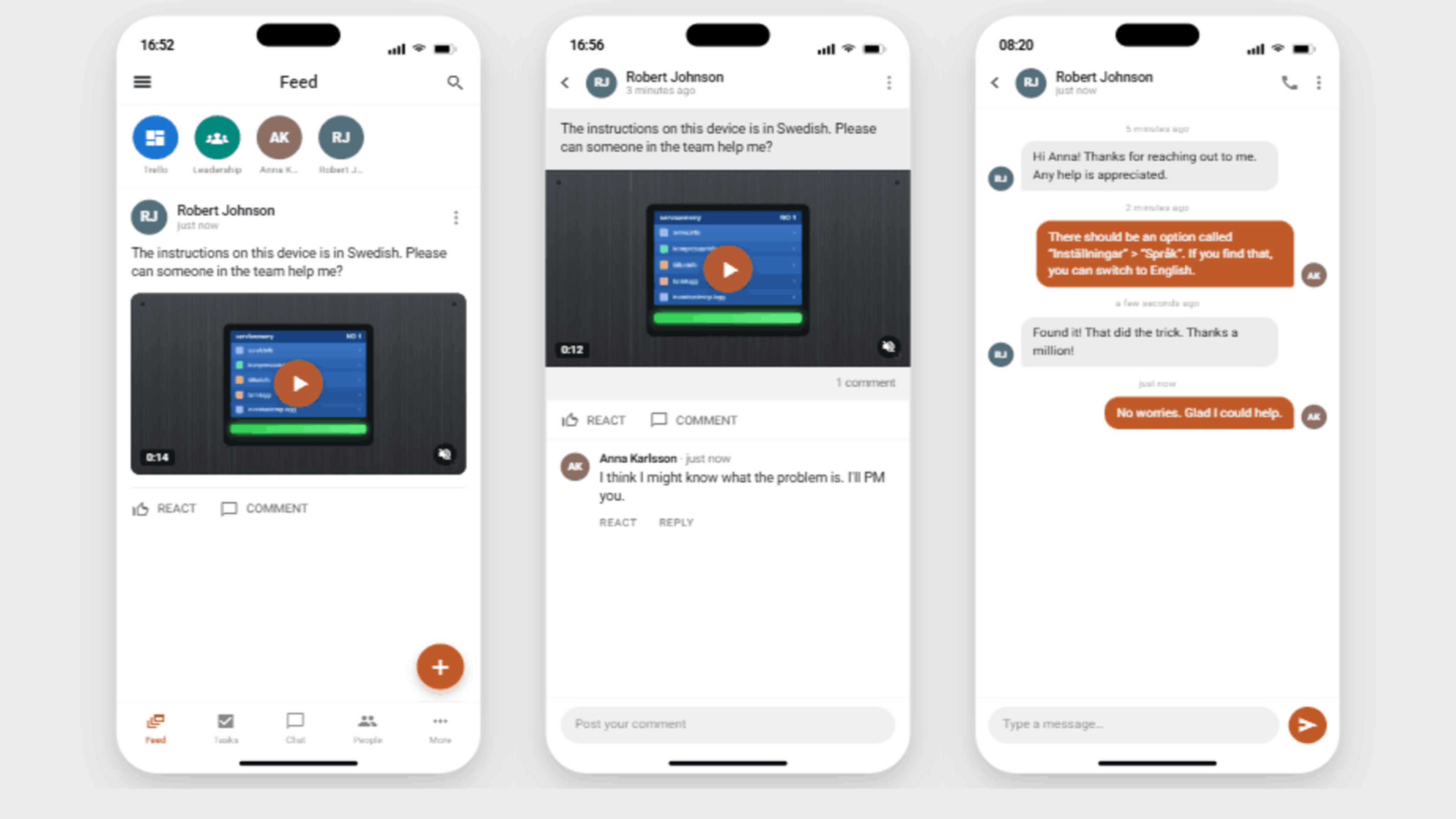
When frontline workers can't reach the intranet quickly, they don't go without communication. Instead, they build their own channel, usually a WhatsApp group or a text chain nobody in Comms can see, moderate, or verify. A frontline intranet needs integrated chat, voice notes, and video calls built into the same app employees already open for company news, so urgent updates and everyday conversation live in one governed channel instead of two disconnected ones.
Not every worker carries a device on shift, either. Digital signage extends the same updates into shared physical spaces, including factory floors, warehouse break rooms, and back-of-house retail areas, to ensure messages reach people who never touch a phone during working hours.
Frontline Intranet Feature #2. Smart, Shift-Aware Notifications
A notification system that treats every worker as always-on gets ignored fast. Shift-aware delivery holds routine updates until a worker is actually on shift, while urgent safety alerts and emergency broadcasts still break through immediately, regardless of the time.
Targeting by role and location matters just as much as timing. A warehouse team should see its own safety notice, not a head-office newsletter irrelevant to their day.
Frontline Intranet Feature #3. Multilingual & Accessible by Design
Frontline workforces are often more linguistically diverse than office populations, and safety-critical content has to land correctly the first time. There's rarely a second chance to explain a hazard warning. Real-time translation is a great way to remove the lag between publishing an update and every location being able to read it in their own language.
Accessibility matters equally: WCAG-compliant contrast ratios, consistent navigation, and support for low digital literacy ensure the platform works for every worker, not just the digitally fluent ones. This is one of the few features that's simultaneously a Comms concern (does the message actually land?) and an HR/compliance one (does failing to reach someone create liability?).
Frontline Intranet Feature #4. Recognition and Two-Way Feedback
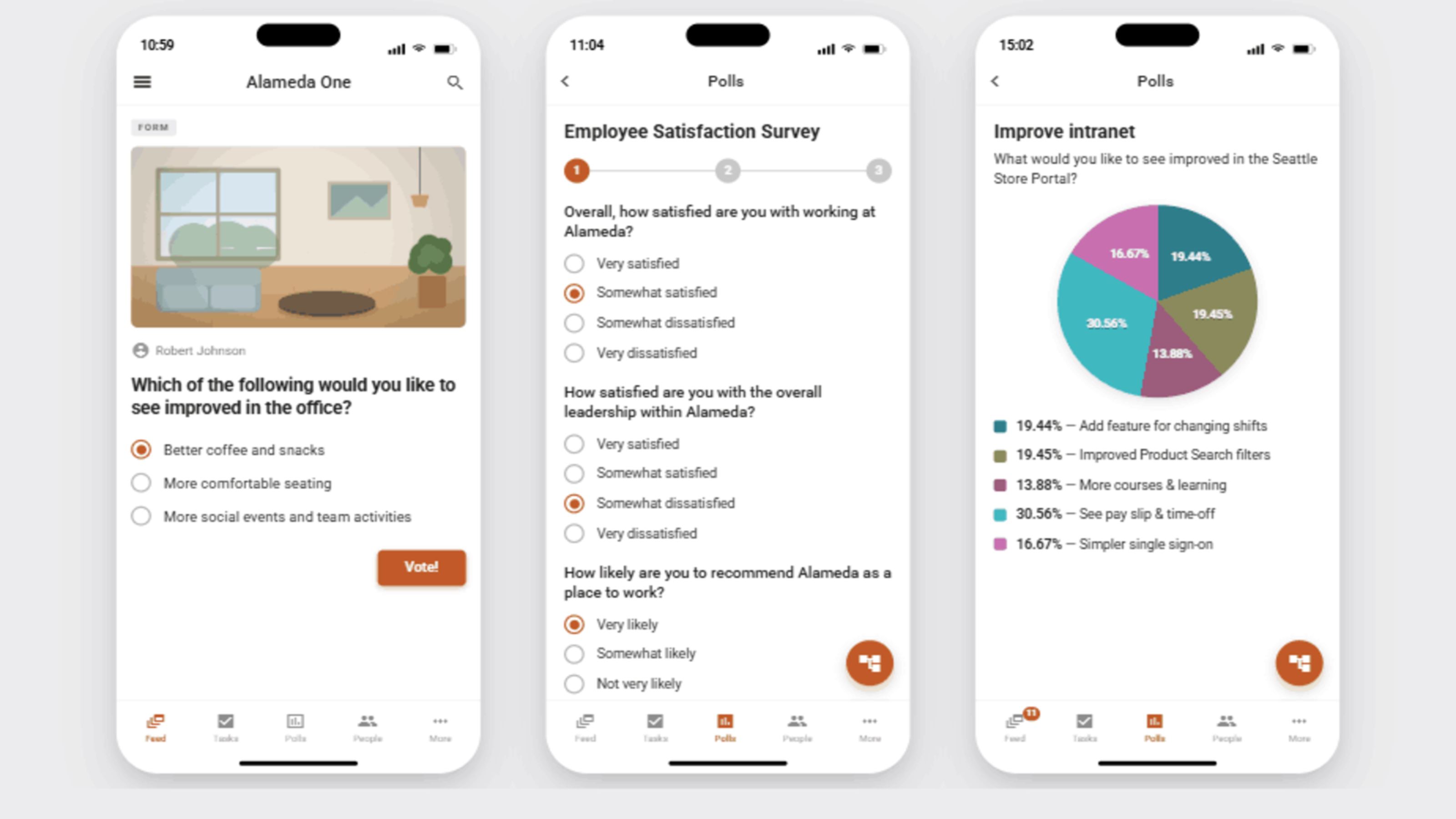
Frontline employees are frequently the last to hear company news and the first to be forgotten when it comes to recognition, a combination that drives disengagement and turnover. Built-in peer-to-peer shoutouts and visible leadership recognition close part of that gap.
The other half is listening: real-time pulse surveys and sentiment tracking let leadership hear about a problem while it's still small, rather than discovering it in next quarter's turnover numbers.
Frontline Intranet Feature #5. Self-Service Onboarding
Many frontline workers don't have a corporate email address, and platforms that require one create a real adoption barrier before a worker has even opened the app once. QR code or SMS-based sign-up solves this directly – a worker scans a code or texts a number and is in, no IT provisioning required.
Local, distributed user management lets a site or store manager onboard a seasonal or contract hire the same day, which matters enormously in industries like retail and hospitality where frontline turnover is constant.
What analysts say: ClearBox's 2026 review specifically called out flexible, non-standard enrollment as a genuine differentiator among frontline platforms, naming Omnia as one vendor offering this approach. Methods mentioned include phone or payroll number sign-up, QR self-registration, and manager-managed local accounts.
Frontline Intranet Feature #6. No-Code Mini-Apps for Everyday Self-Service
Downloading a payslip or requesting leave shouldn't require a phone call to HR or a trip to a service desk. No-code mini-apps, wired directly to HR and payroll systems, let frontline staff complete the most common employee-service tasks from their phone in under a minute. This also includes delivery of tickets assigned to the user – and the possibility to easily report back and register work hours per case.
Because they're no-code, IT isn't stuck building a custom integration every time a new self-service need comes up — the mini-app model scales to whatever the workforce actually asks for.
Frontline Intranet Feature #7. Built-In Compliance Tracking
“Knowledge checks” and “read the policy” are not the same as proof that someone actually read and understood it. Sign-off requests with recurring schedules and per-request completion tracking give supervisors an audit trail — who acknowledged the safety update, who completed the training, and who still hasn't — without a spreadsheet in sight.
In regulated or safety-critical industries, this isn't a nice-to-have; it's the difference between a fast, defensible answer during an audit and a scramble to reconstruct who knew what.
Frontline Intranet Feature #8. A Mobile-First Experience That Reconfigures by Role
Mobile-first doesn't mean “the desktop site, but smaller.” It means the app itself changes shape by role: a technician, a cashier, and a security guard should each open something arranged around their own tasks, news, and tools — not a generic portal squeezed onto a smaller screen.
This same mobile experience also needs to work when connectivity doesn't: offline access to essential documents and procedures is a genuine safety requirement for drivers, field engineers, and anyone working somewhere a signal can't be guaranteed, not a convenience feature to cut in the first budget round.
What analysts say: Gartner's Magic Quadrant defines this kind of role-specific mobile experience as a distinct capability area it calls frontline support, built around mobile superapps and mini-apps rather than a shrunk-down desktop view. Vendors offering this without requiring a Microsoft 365 licence — Omnia among them — were highlighted as differentiators for organizations with large frontline populations.
Frontline Intranet Feature #9. AI Guidance That Goes From Question to Completed Task
The bar for AI in a frontline intranet isn't “can it answer a question” — a frontline worker typically has about 15 seconds to find what they need before they give up and ask a colleague instead. The bar is whether AI can also help finish the job. Ask a question and it should pull an answer from governed content; open a task and it should walk through the next steps, pulling in whatever back-end systems are involved.
A good example is incident reporting: a worker photographs a hazard or a defect, the app captures location automatically, and the case routes straight into the correct back-end system — structured field evidence instead of a verbal handoff that gets lost by the next shift change. For hands-busy moments, voice input covers the final step too, like logging hours without typing a word.
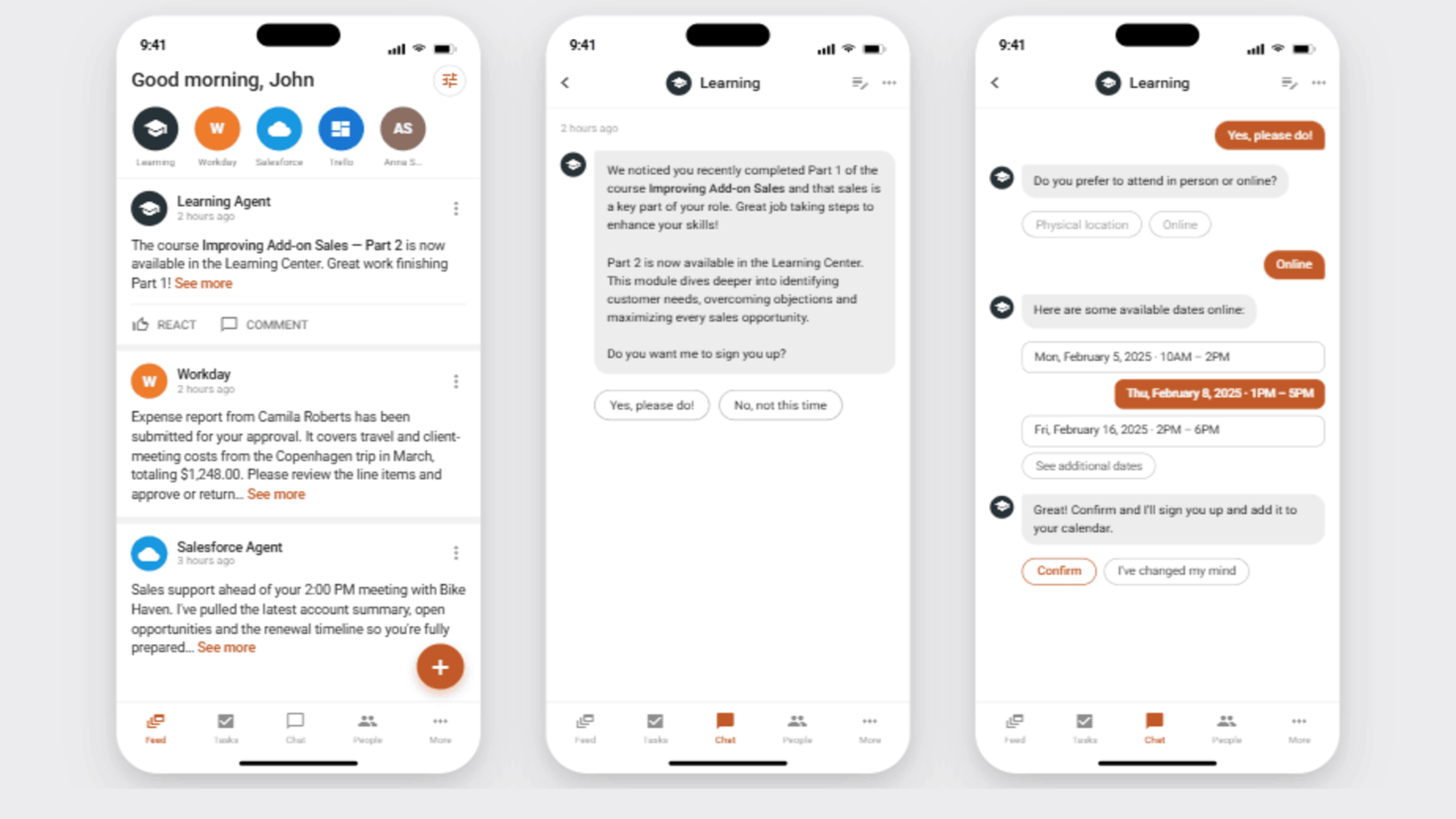
The same proactive pattern applies to skills and certifications. A learning agent that notices a worker just completed one course can immediately surface the next one or flag a certification nearing expiry and walk them through booking the renewal. In this way, "keeping the team certified" becomes something the system handles continuously, rather than something a manager chases down every quarter.
Frontline Intranet Feature #10. Frontline-Specific Analytics
Aggregate intranet metrics are almost always skewed by desk-based usage, which means leadership can look at healthy-looking adoption numbers while frontline engagement is quietly failing underneath them. Analytics need to be segmented specifically for frontline populations. Metrics such as adoption, read receipts, and task completion should be tracked on their own, not folded into a company-wide average.
This is also what turns a frontline intranet from a communications nice-to-have into something IT, HR, Comms, and Ops can jointly report on with real numbers behind it.
Beyond Frontline Intranet Features – Three Things This List Doesn't Cover
Three important considerations didn't make the list above — not because they don't matter, but because they aren't features you can bullet the same way. They're evaluation lenses that cut across several items above:
Licensing model. Whether a platform requires a Microsoft 365 licence or a corporate email address determines how well items #5, #6, and #8 actually work in practice for your organization. This is arguably the single most consequential yes/no question in a vendor evaluation, and it's worth asking before comparing feature checklists line by line. Both Gartner and ClearBox flag this as a market-wide gap: Gartner notes that many IPS vendors are still learning how to serve deskless workers without leaning on Microsoft licensing, while ClearBox found that frontline employees without M365 licences can add meaningful hidden cost if a platform doesn't offer an alternative access route.
Design for the user, not the feature list. None of the 10 features above land if they're designed with an office-worker mental model. Frontline users are infrequent visitors who open the app in short, task-focused bursts — reporting time, requesting leave, closing a ticket — often on a personal mobile device, sometimes in hazardous environments where reading a long article isn't realistic. Many aren't especially digitally literate, and not everyone is comfortable typing on a phone keyboard to search, fill in a form, or submit a request; voice input needs to be a genuine alternative to text, not an accessibility afterthought bolted onto one feature. Most frontline workers also have little appetite for corporate news; they're there to get something done, not to browse. To make the solution fit for purpose, every feature above needs to be designed and tested against that reality.
Industry verticalization. A retail deployment and a manufacturing deployment will lean on this list differently — a factory floor cares more about #7 and #9's incident-capture pattern, while a hospitality business leans harder on #5's fast seasonal onboarding. Ask any vendor how their mini-app and workflow model adapts to your specific industry, not just whether the generic features exist.
Frontline Intranet Features – a Quick-Reference Comparison
The ten features above cover a lot of ground: real-time communication, licensing, compliance, and analytics all in one list.
Use the table below as a quick-reference version to bring into a vendor evaluation: each row pairs the feature with why it matters and the specific question worth asking a vendor directly, rather than trusting a feature-list checkbox.
Feature | Why It Matters | What to Ask Vendors |
Real-time communication + signage | Prevents shadow-app sprawl and reaches workers without devices | Does it include digital signage for shared spaces? |
Shift-aware notifications | Cuts through noise without ignoring urgency | Can targeting combine role, location, and shift schedule? |
Multilingual & accessible | Safety content must land the first time | Is translation real-time or manually managed? |
Recognition & feedback | Directly tied to frontline retention | Are pulse surveys anonymous and segmentable? |
License-free onboarding | Removes the #1 adoption barrier | Is enrollment QR/SMS-based, with no IT provisioning step? |
No-code mini-apps | Scales self-service without custom dev work | Can non-technical admins build and connect new mini-apps? |
Compliance tracking | Creates an audit trail, not just content | Does it support recurring sign-off schedules? |
Mobile-first, role-based, offline-ready | Determines real-world daily usability | Does offline mode cover documents workers actually need on-site? |
AI guided task completion | Differentiates “search” from “getting the job done” | Can AI actions write back to connected business systems? |
Frontline-specific analytics | Prevents desk-based usage from masking frontline failure | Can adoption reporting be segmented by workforce type? |
A completed checklist isn't a decision on its own — four things are worth doing before you commit to a shortlist.
Ask the vendor questions as above directly. A vague or hedged answer might tell you more than what a polished demo will do.
Revisit the three evaluation lenses covered earlier - licensing model, designing for the frontline user, and industry verticalization. They change how much weight each row deserves for your organization specifically.
See the features working together, not just listed separately. Onboarding, incident capture, and AI-guided task completion often depend on each other in practice, which is easier to judge in a live walkthrough than in a spec sheet.
Investigate what AI can do for frontline teams. When evaluating how AI-powered capabilities can be utilized, focus on how these can help frontline workers to actually get work done – not only get questions answered.
For the strategic case behind this checklist — why frontline intranets matter as a business priority, not just an IT project — see our companion piece, Intranet for Frontline Workers: Mobile-First Solutions that Drive Productivity. Or if you're ready to see these ten features in your own environment, book a live walkthrough →
Learn More
If you want to learn more about successful intranet solutions for frontline audiences, please check the resources below:
Intranet for Frontline Workers: Mobile-First Solutions that Drive Productivity — our companion deep-dive on the business case for frontline intranets and where AI fits into frontline productivity.
Mobile-First Intranet Solutions that Engage Your Frontline Teams — read up on rollout and adoption.
AI Features in Intranets: How Omnia Enhances Productivity and User Experience — a deeper look at AI-driven productivity across the intranet.
Intranet Software Pricing 2026: Costs, TCO, and How to Compare Vendors — to understand intranet licensing models.
Download: 2025 Gartner® Magic Quadrant™ for Intranet Packaged Solutions
Download: ClearBox Consulting's Intranet & Employee Experience Platforms 2026 Report
About the author
Anders Fagerlund is an intranet and employee experience expert specialising in Microsoft 365-based digital workplace solutions. With more than 20 years of experience in intranet strategy, knowledge management, employee engagement, and digital workplace transformation, he helps organisations improve communication, productivity, and employee experience through modern, value-driven intranet solutions.
The Omnia team has recently picked up the ninth consecutive ClearBox Choice Award, with three 2026 badges — Top 5 Products, Best for Value, and Search & Knowledge Finding. Omnia is also named a Challenger in the 2025 Gartner Magic Quadrant for Intranet Packaged Solutions.
Published: July 2026
Frequently Asked Questions – Frontline Intranet Features
What's the difference between a frontline intranet and a regular intranet?
A regular intranet typically assumes a corporate email address, a desktop or laptop, and time during the workday to browse it. A frontline intranet is built around workers who have none of those three things — access is mobile-first, enrollment doesn't require IT provisioning, and content is pushed to workers rather than waiting for them to come looking.
Do frontline intranets require Microsoft 365?
Not the ones built specifically for frontline use. Requiring an M365 licence or corporate email address is one of the most common reasons frontline workers get excluded from a company intranet in the first place — look for platforms that support QR code, SMS, or local account-based enrollment instead.
Can a frontline intranet work without an internet connection?
Yes, if it's designed to. Offline access to essential documents and procedures is a genuine requirement for drivers, field engineers, and anyone working in low-connectivity environments — not an edge case to deprioritize.
How is AI actually used in a frontline intranet?
Beyond answering questions, AI in a frontline intranet increasingly helps complete tasks — pulling guidance into a workflow, capturing photo-and-location evidence for incident reports, and writing updates back into connected business systems automatically.
How long does it take to roll out a frontline intranet?
A phased rollout — starting with a pilot team and a small set of high-value use cases — typically reaches initial adoption in 4–8 weeks, with full deployment depending on integration complexity and how many mini-apps or workflows need to be built.